Sets and Record Visualizations
Introduction
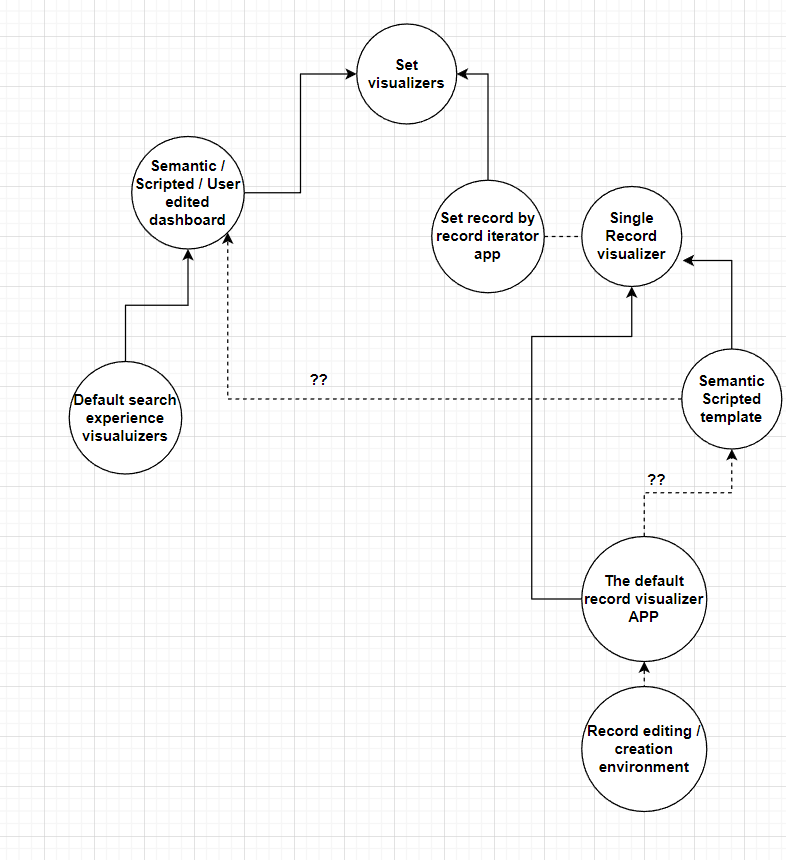
In octostar we have: set viewers, which can show sets of records (e.g. a dashboard showing people) and single record viewers e.g. that can give the detail on a person.
For each type (single or set) there are then many subtypes , for example:
- the single record viewer, can be used to show a set - simply by showing records "one by one"
- Special Apps can act as either set or single record visualizers
Here is a diagram (to be updated)
For the end user the experience is as follow:
-
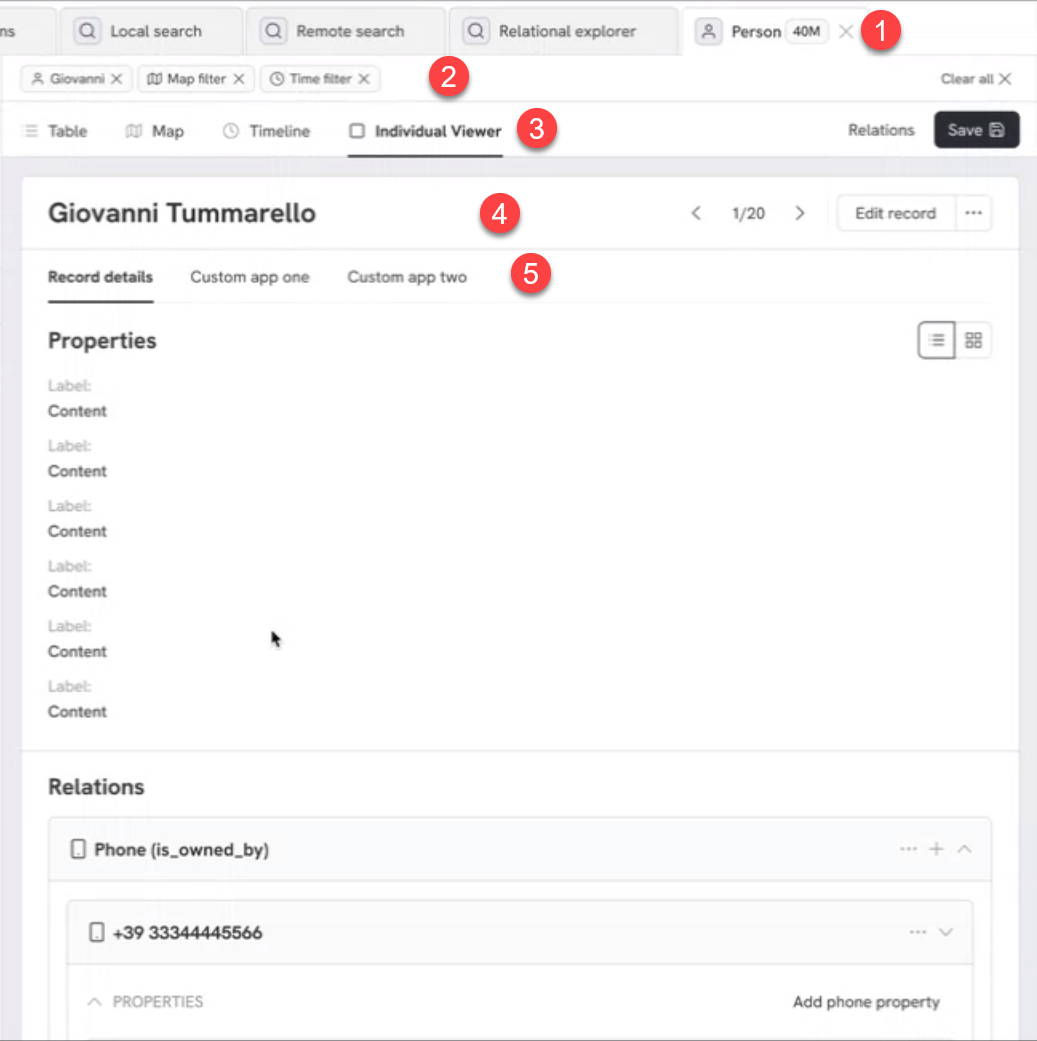
we are looking at 40M people (Set viewer)
-
there are however filters drilling this down to 20 (note we'll show 20 evenctually)
-
we have selected the "individual viewer" set viewer. This is a set viewer that use the "individual views" e.g. shows one person at a time but allows navigation to the next.
-
we are now looking at record 1/20 specificallyt the one on Giovanni Tummarello
-
we have multiple viewers available for this record, in this case we're using the "record detail view"
There are built in visualizers and scripted visualizers
Creating and configuring "Set of records visualizers"
There are 3 ways by which sets of records can be visualized:
- Semantically bound dashboards - when a dashboard is created and bound to a concept it is said to be "semantically bound" that is it can be used to visualize a set of a specific concept.
- Semantically bound apps - these are apps which declare in their manifest that they can be used to visualize a set of a given concept. For example an app for "people" might find the most suspecious person among the set based on direct comparisons and other lookups.
These can be configured as viewers and therefore used directly from a dataset view or can be simply "semantically bound" to a concept and therefore just show up in the "open with" context menu of the Set.
Semantically bound dashboards
The first and easiest builtin visualizer are the Dashboards which can be created to visualize the concepts as it is better fit for the specific deployments
Semantically bound apps
See Writing APPs (General)
Semantically bound custom set templates
These follow the same mechanisms as explained in the "record template" below but simply require the manifest to specify that they will also take a set
Iteration of Record Visualizers
In the screenshot below we can see that the People dataset (20 people) is being visualized "1 record at a time" and now displays "giovanni tummarello" (which himself can be seen using the Individual Record Visualizers
Creating and configuring "Individual Record Visualizers"
There are 3 types of individual Record Visualizers:
- Record viewer this is the standard way to edit a record and to visualize it in a relatively standardized "field by field" way.
- Record templates: these allow records to be visualized in a very rich and free way. Templates can perform arbitrary queries, can include multimedia and more
- Semantically bound apps: Again an APP can declare that it can act as a single record visualizer
Record viewer
The default Record Viewer allows individual records to be visualized in field by field fashion and be edited, including editing of relations with other records.
The Record viewer accepts configurations that allows one to change the field order, visibility, accepted value types and more.
However in absence of a specific configuration, the Record Viewer will show:
- all the fields, in alphabetical order.
- standard visualization widgets according to the types
- no custom validation
Customizing the Record viewer (and its effect on the schema)
The templates that allow one to create or edit records can be customized so that:
- Some fields can be hidden or can be marked as "required"
- Orders can be changed
- Custom validation rules can be set.
note that performing this customization will not only operate at "visual" level but will also impact the way records are validated before being added to the DB also if operating at API level (E.g. records created by applications will have to respect the rules set in the Editable Record Templates.
This in effect allows one to have a richer schema control, by allowong only certain values to appear in specific fields.
To do this, an administrator will typically operate within an administrative workspace):
- create the "/templates" in the root of the administrative template (this is one of Octostar "magic folders" )
- Inside the template directories, create other directories named like the concepts (e.g. "/templates/person")
- Inside these directors place the following files to customize the DAVE experience:
- schema.yaml - will validate the individual fields (including required or not)
- schema-ui.yaml - define how the fields look individually
Record Templates (Custom visualizers)
It is possible to have an arbitrary number of extra templates per Concept but at SET level or at individual record level
Semantically bound apps
These are applications which register a manifest and can act as record visualizers visualizer for a given concept ( Writing APPs (General) )