Automated Data Processing Integration (NiFi)
Apache NiFi is a powerful engine to perform multi-step data processing and orchestration using graphs which describe how data should flow from source(s) to processing steps to output(s).
The tool comes with a fully-fledged graphical interface, unlike any others in the market. It allows users immediate feedback into the inner workings of the pipeline, as well as manage data provenance and modify workflows via drag-and-drop. The tool also comes with a very robust Rest API to perform all such operations programmatically.
[
Apache NiFi
Apache NiFi is an easy to use, powerful, and reliable system to process and distribute data
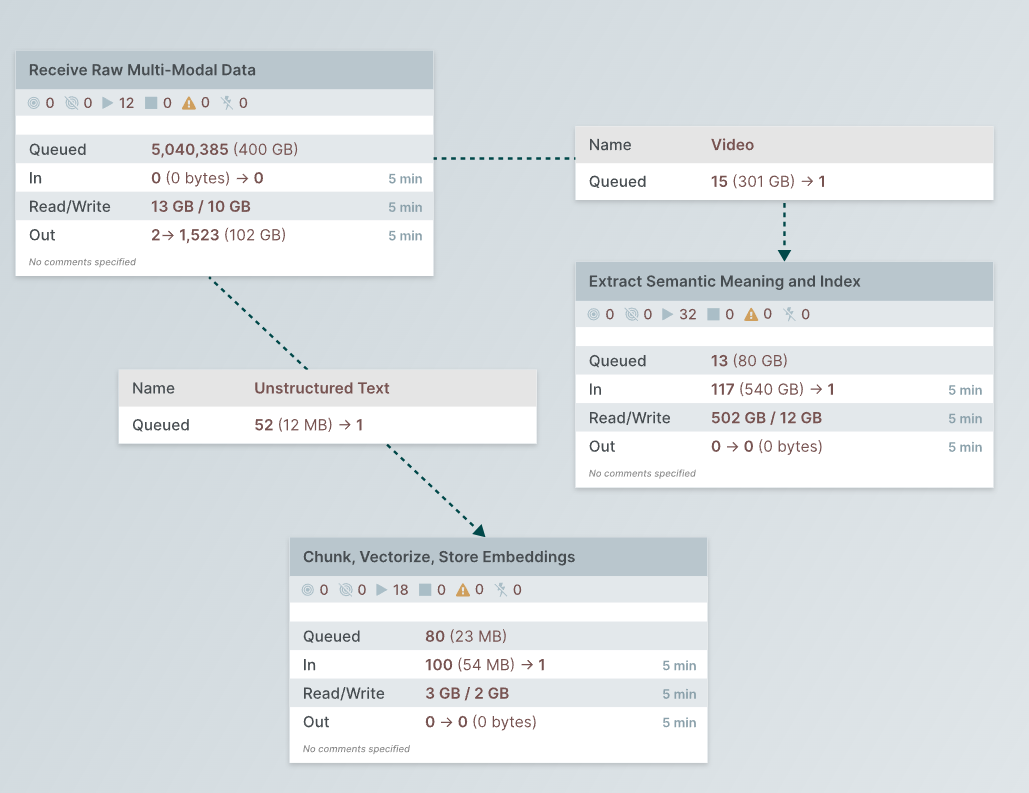
Admin users can access the NiFi installation in Octostar via a dedicated page, which can be found under Account➝Admin➝NiFi. It is also accessible by navigating to https://nifi.{env_name}.octostar.com.
Integration Between Octostar and NiFi
Within the Octostar platform, NiFi is used to enable apps to perform large-scale, computation-heavy, co-operative data processing. Any deployed Octostar app which exposes a REST API can participate in the pipeline processing.
The Octostar pipeline is invoked for automatic processing of Octostar entities, whether they are files, people, companies, vehicles... Anything that can be represented in the ontology can be processed by the pipeline.
The key components in the NiFi-Octostar integration are:
- Processor: A computational unit in the pipeline. There are plenty of out-of-the-box processors that NiFi provides, and custom ones can be built as needed. Each processor is preceded by a queue, in which data accumulates as it waits to be processed. Processors (and queues) have a variety of settings: they can be scaled in number, be scheduled, have a number of retries and have a set of parameters which can be set per-flowfile.
For Octostar, the most important type of processor is the InvokeHTTP processor, which is used to communicate between the pipeline and apps through HTTP. This processor is wrapped in a processor group which encompasses all operations related to a single processor call, from batching the input data, polling for the status of the task (if using an asynchronous pattern with Celery) to performing clean-up and redirecting to failure
- FlowFile: Data passing through the pipeline. A FlowFile is conceptually similar to a file but it lives inside the NiFi environment only, as it passes one processor after the other or resides in a queue. FlowFiles are associated with a set of attributes, which processors can write and read to modify their own behavior.
In Octostar, FlowFiles are JSON files and represent one or more Octostar entities. This representation includes their record, contents, request information and additional information the pipeline uses to process them. FlowFile attributes can be set from the JSON contents (and viceversa) through processors, allowing Octostar and NiFi to share a thin layer of information
- App Endpoint: Apps participating in the pipeline are represented in NiFi as
InvokeHTTPprocessors (and their processor group as a whole). This processor sends an HTTP request to an app on a particular endpoint agreed by both parties. The app will thus receive a NiFi FlowFile (= a batch of entities) at the specified endpoint. The app will then parse the JSON contents (aided by an integration library Writing App Pipeline Endpoints), perform some computation on the entities, and output a similarly-structured JSON back to the pipeline. This pattern may be synchronous or asynchronous, in the latter case
FLOWFILE CONTENTS AND ATTRIBUTES
NiFi bases its processors logic (for the most part) on FlowFile attributes. On the other hand, apps will receive via HTTP only the contents of a FlowFile, not it's attributed. Hence, for apps to know attributes, metadata, and parameters for the processing, the FlowFiles are formatted as a JSON instead of, say, raw bytes, where the JSON contains both the actual entity record and additional processing metadata.
When there is a need to exchange this information between the JSON and NiFi attributes, a set of conventions in the app output and a set of NiFi processors are used to go contents➝attributes and attributes➝contents. The former is a common and supported use case available to each app processor, while the latter should only be used for error handling and other specific use cases.
The NiFi Dashboard App
The integration is completed by an app called NiFi Dashboard. The app is responsible for:
- Listening to Octostar for new or modified entities (via a redis pubsub)
- Formatting and sending those entities to NiFi
- Flagging entities based on their pipeline processing status
- Indexing entities at the end of their processing, to be sent to OpenSearch
- Performing some standard processing operations, like duplicating an entity into N fragments
- Offering an admin-only graphical interface for operations between Octostar and the pipeline (e.g. removing all pipeline entity flags, re-indexing certain entities, making custom queries to the OpenSearch index, and so on)
THIS APP IS NOT OPTIONAL
If this app is not correctly deployed, the NiFi pipeline will not function, as it will not receive update events of entities, nor can it flag entities appropriately.